
Help [+rep] - Printable Version
+- SA-MP Forums Archive (https://sampforum.blast.hk)
+-- Forum: SA-MP Scripting and Plugins (https://sampforum.blast.hk/forumdisplay.php?fid=8)
+--- Forum: Scripting Help (https://sampforum.blast.hk/forumdisplay.php?fid=12)
+--- Thread: Help [+rep] (/showthread.php?tid=533013)
+- SA-MP Forums Archive (https://sampforum.blast.hk)
+-- Forum: SA-MP Scripting and Plugins (https://sampforum.blast.hk/forumdisplay.php?fid=8)
+--- Forum: Scripting Help (https://sampforum.blast.hk/forumdisplay.php?fid=12)
+--- Thread: Help [+rep] (/showthread.php?tid=533013)
Help [+rep] - ScorpiusMalfoy - 21.08.2014
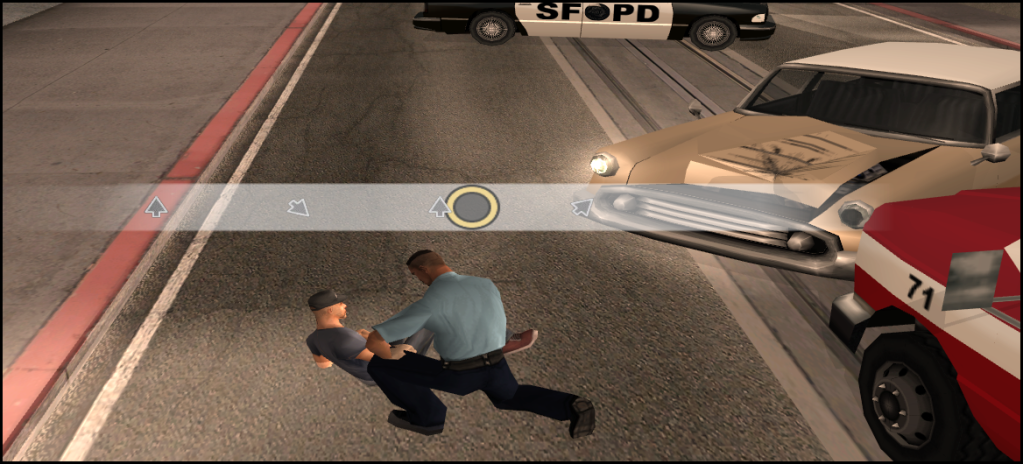
Anyone can help me how to moving Textdraw using textures pls, im test with TextDrawSetString still don't work with textures only text can moving on so anyone can help me with this pls ! Thanks and i'll +rep for you !
Like a mission low rider offline there : https://www.youtube.com/watch?v=jtwl1ZATR6c
Re: Help [+rep] - Joe Staff - 21.08.2014
There is no direct method of moving a TextDraw other than either adding/reducing invisible characters in the string or complete removal and redefinition of the TextDraw. The former being less accurate and the latter being overly power consuming.
Re: Help [+rep] - ScorpiusMalfoy - 21.08.2014
So this funtion is impossible ? :< I see an server using that for emsdeploy then i wanted to create that. There is it
Re: Help [+rep] - Joe Staff - 21.08.2014
Didn't say impossible, simply inefficient. I personally wouldn't use it because it's a minor abuse of the system. Look at Image to TextDraw systems, yeah technically it works, but it's just too much.
Re: Help [+rep] - ScorpiusMalfoy - 21.08.2014
ya ==" i think i need to foget this and back to real :<
Re: Help [+rep] - Joe Staff - 21.08.2014
Quote:
|
Originally Posted by ******
 y_td has text draw move functions, but it is a bit out of date atm.
|
Re: Help [+rep] - Vince - 21.08.2014
For this particular example, what you could do is use the predefined arrows; ~<~ (left), ~>~ (right), ~u~ (up) and ~d~ (down). Then add a timer and insert a space with each iteration to give the illusion of movement.
Re: Help [+rep] - Virtual1ty - 21.08.2014
Quote:
|
Originally Posted by Vince
For this particular example, what you could do is use the predefined arrows; ~<~ (left), ~>~ (right), ~u~ (up) and ~d~ (down). Then add a timer and insert a space with each iteration to give the illusion of movement.
|