

String in a dialog
#1

Hi.
I have a few questions.

1. How to put a new line in: format(string... ?

For example:
format(string,sizeof(string), "ID: %i Level: %i", id, level);

I want it to print:
ID: 10
Level: 3

I tried \n and \r but nothing worked...


2. How to put string in dialog (messagebox style).
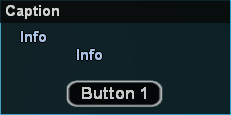


Let's say I wan't to print:
ID: 10
Level: 3

inside a dialog.
Reply
#2

See this then you can understand Example:
Код:
 	new string[318];
	format(string,sizeof(string),"Example Number :%i",Example);
	ShowPlayerDialog(playerid,Example,DIALOG_STYLE_MSGBOX,"Example",string,"Nice","Huh?");
use the string in showplayerdialog.
Reply
#3

String size 318.. lol. Anyways, you can use string in dialogs like this:

pawn Код:
new string[128];
format(string, sizeof string, "ID: 10\nLevel: 3");
ShowPlayerDialog(playerid, 1000, DIALOG_STYLE_MSGBOX, "Stats", string, "Ok", "Cancel");
The \n splits it.

E:// The_King, your code wont work because dialogid cant be "example", it has to be an integer.
Reply
#4

Quote:

String size 318.. lol. Anyways, you can use string in dialogs like this:

pawn Code:
new string[128];
format(string, sizeof string, "ID: 10\nLevel: 3");
ShowPlayerDialog(playerid, 1000, DIALOG_STYLE_MSGBOX, "Stats", string, "Ok", "Cancel");

The \n splits it.

:O i was In Hurry. hehehe
Reply
#5

Thanks, that was helpful.

But what about new line in string?

If I put like this:
format(string,sizeof(string), "ID: %i \nLevel: %i", id, level);
SendClientMessage(playerid, -1, string);

It writes this:
ID: 6 Level: 20

I want level in new line... :/
Reply
#6

Quote:

Thanks, that was helpful.

But what about new line in string?

If I put like this:
format(string,sizeof(string), "ID: %i \nLevel: %i", id, level);
SendClientMessage(playerid, -1, string);

It writes this:
ID: 6 Level: 20

I want level in new line... :/

You are useing SendClientmessage and SendClientMessage Cant split 2 lines by using \n you have to use

format(string,sizeof(string),"ID: %i",id);
format(string2,sizeof(string2),"Level: %i",Level);
SendClientMessage(playerid, -1, string);
SendClientMessage(playerid, -1, string2);
Reply
#7

Quote:
Originally Posted by THE_KING$5$
Посмотреть сообщение
You are useing SendClientmessage and SendClientMessage Cant split 2 lines by using \n you have to use

format(string,sizeof(string),"ID: %i",id);
format(string2,sizeof(string2),"Level: %i",Level);
SendClientMessage(playerid, -1, string);
SendClientMessage(playerid, -1, string2);
or even easyer and more efficient

pawn Код:
new string[64];
format(string,sizeof(string),"ID: %i",id);
SendClientMessage(playerid, -1, string);
format(string,sizeof(string),"Level: %i",Level);
SendClientMessage(playerid, -1, string);
No need to create two different strings
Reply
#8

You cant use that in SendClientMessage, and THE_KING, why to use 2 strings when you can use one?

pawn Код:
format(string, sizeof string, "ID: %i",id);
SendClientMessage(playerid, -1, string);
format(string, sizeof string, "Level: %i", Level);
SendClientMessage(playerid, -1, string);
Reply
#9

When making a dialog, Splitting a string when you have variables will not work and will only show the last string made.
Reply
#10

Thanks everybody. You helped me a lot.

Quote:
Originally Posted by Dan.
Посмотреть сообщение
You cant use that in SendClientMessage, and THE_KING, why to use 2 strings when you can use one?

pawn Код:
format(string, sizeof string, "ID: %i",id);
SendClientMessage(playerid, -1, string);
format(string, sizeof string, "Level: %i", Level);
SendClientMessage(playerid, -1, string);
I really didn't know you can do that. Thanks.
Reply


Forum Jump:


Users browsing this thread: 1 Guest(s)